OpenAI shuts down Agent Builder on November 30, 2026, 19 days from today. Every workflow you drew on its canvas needs a new home before then, and the Evals dashboard and API go dark the same day.
OpenAI's own answer is to export each workflow as Agents SDK code. That export is the starting point for every OpenAI Agent Builder alternative on this page, because none of them imports an Agent Builder graph. We scored 11 builders and frameworks on seven named criteria, with prices, weak spots and a migration plan.
When Agent Builder shuts down: the dates
OpenAI lists the shutdown on its deprecations page. The Agent Builder entry opens: "On June 3, 2026, we notified developers using Agent Builder that the product is being deprecated. ChatKit remains available." The dates, quoted exactly from that page:
| Product | Date | What OpenAI says |
|---|---|---|
| Agent Builder | June 3, 2026 | "Deprecation announced for Agent Builder." |
| Agent Builder | Nov 30, 2026 | "Agent Builder is scheduled to shut down." |
| Evals platform | Oct 31, 2026 | "Existing evals become read-only." |
| Evals platform | Nov 30, 2026 | "The Evals dashboard and API are scheduled to shut down." |
| Reusable prompts | Nov 30, 2026 | "The v1/prompts API and reusable prompt objects are scheduled to shut down." |
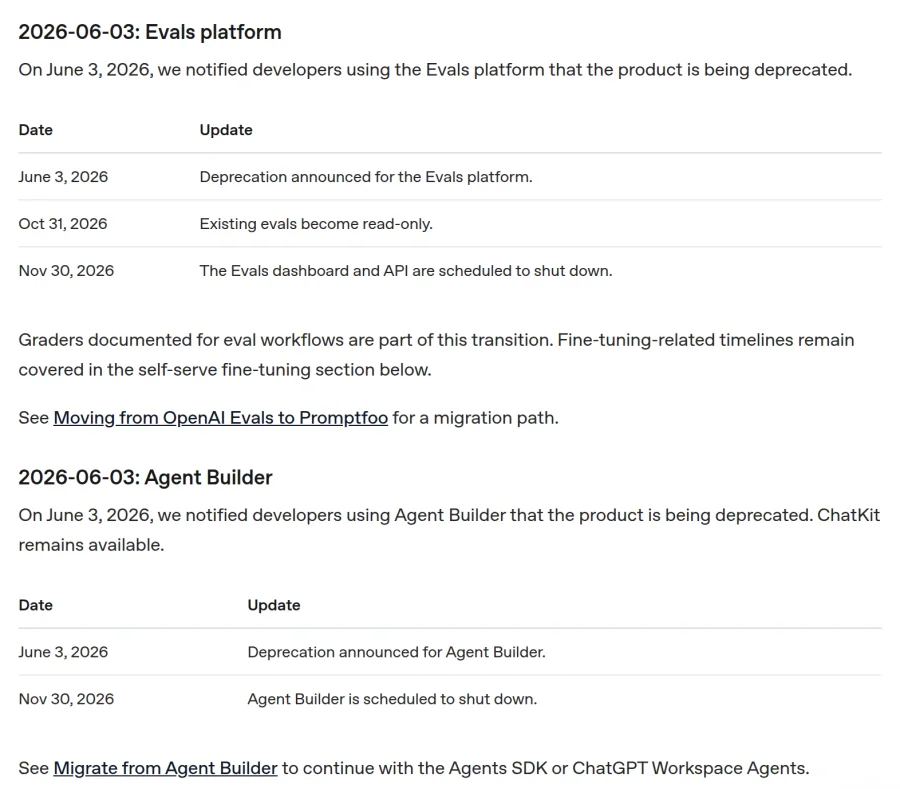
Screenshot of OpenAI's deprecations page, captured November 11, 2026.
OpenAI's recommended path is in the same entry: "See Migrate from Agent Builder to continue with the Agents SDK or ChatGPT Workspace Agents." Its migration guide adds a warning: "This process does not convert your workflow graph or guarantee that every behavior transfers unchanged." Agent Builder is one of nine services on our developer service shutdown tracker with a date still ahead, and it is the first to go.
How we ranked these OpenAI Agent Builder alternatives
Agent Builder gave you a canvas, OpenAI models, tools and MCP, trace graders, and a hosted chat through ChatKit. We scored every entry on seven criteria that ask how much of that it gives back. Every row links to the vendor page we read on November 11, 2026.
- Visual canvas. Yes: a drag-and-drop node canvas for agent workflows. Partial: a form or natural-language builder, or a graph view of code. No: code only.
- Model choice. Yes: OpenAI models and at least one other provider, in the product itself. Partial: other providers only through a beta adapter. No: one vendor's models only.
- Tools and MCP. Yes: agents call remote MCP servers as tools, plus function or HTTP tools. Partial: tools but no MCP. No: no tool calling.
- Evals or tracing. Yes: built-in run traces and built-in evals (test sets or graders). Partial: one of the two. No: neither.
- Hosting. Yes: the vendor hosts the agent, and an API returns its answer or a chat embeds on your site. Partial: you host it yourself, or it is hosted without either of those. No: no way to deploy.
- $0 plan. Yes: a hosted $0 plan with no end date (model usage can be billed on top). Partial: a trial, or $0 only as open-source code you run. No: paid only.
- Migration effort. Yes: OpenAI's migration guide names it. Partial: it runs or traces Agents SDK code, the format Agent Builder exports. No: you rebuild by hand.
Yes is worth 2 points, Partial 1 and No 0, for a total out of 14. The order of this list follows the totals. Ties go to the higher Visual canvas score, then Migration effort, then $0 plan, then alphabetical order. To be ranked, a tool had to be sold or maintained on November 11, 2026, and let your own app or site call the agent. If one criterion matters more to you, re-rank by that column.
Best OpenAI Agent Builder alternatives: a quick overview
If you want the shortest path from your Agents SDK export to a hosted agent:
- Mastra: best for running exported TypeScript agents on a hosted $0 plan.
- OpenAI Agents SDK: best for keeping the export as it is and hosting it yourself.
If you want a drag-and-drop canvas again:
- Dify: best visual builder with a hosted $0 plan.
- n8n: best for agents that sit inside bigger automations.
- Langflow: best for running an open-source canvas on your own servers.
If evals were the part you used most:
- LangGraph and LangSmith: best for tracing and evals that don't depend on OpenAI's Evals platform.
If your company already pays for a platform:
- Microsoft Copilot Studio: best for teams on Microsoft 365 and Teams.
- Google ADK and Gemini Enterprise Agent Platform: best for teams on Google Cloud.
- ChatGPT Workspace Agents: best for ChatGPT Business or Enterprise teams that want agents without code.
If you build agents for sales and operations work:
- Relevance AI: best for multi-agent teams on a canvas.
- Gumloop: best for hosted agents that grade their own completed tasks.
Scores as of November 11, 2026. Yes = 2, Partial = 1, No = 0.
| Tool | Score (of 14) | Visual canvas | Model choice | Tools and MCP | Evals or tracing | Hosting | $0 plan | Migration effort | Source |
|---|---|---|---|---|---|---|---|---|---|
| Mastra | 12 | Partial Studio graph view of code | Yes 223 providers | YesMCPClient | Yes tracing and scorers | Yes Mastra Server | Yes Free plan | Partial@mastra/ runs Agents SDK agents | Mastra SDK agents |
| LangGraph and LangSmith | 12 | Partial Studio graph view, no-code from a description | Yes any provider | Yes remote MCP in Fleet | Yes tracing, online and offline evals | Yes Fleet agents by API | Yes Developer plan | Partial traces Agents SDK runs | LangSmith pricing |
| Dify | 11 | Yes Workflow and Chatflow canvas | Yes OpenAI, Anthropic, Gemini and more | Yes HTTP MCP servers | Partial logs, no built-in evals found | Yes web app, API, embed | Yes Sandbox plan | No | Dify pricing |
| Microsoft Copilot Studio | 11 | Yes agent flows designer | Yes GPT, Claude, Grok | Yes Streamable MCP | Yes test sets, activity maps | Yes websites, Teams | Partial trial can't publish | No | Copilot Studio models |
| n8n | 11 | Yes node canvas with AI Agent node | Yes OpenAI, Anthropic, Gemini nodes | Yes MCP Client Tool | Yes test datasets, run replay | Yes hosted and embedded chat | Partial cloud trial, self-host at $0 | No | n8n MCP Client Tool |
| Relevance AI | 10 | Yes Workforce canvas | Yes OpenAI, Anthropic, Gemini | Yes remote MCP by URL | Yes evals, run review | Yes embed chat | No Free plan retired | No | Relevance AI pricing docs |
| Google ADK and Agent Platform | 10 | Partial Visual Builder is experimental | Yes Gemini, Claude, OpenAI in ADK | YesMcpToolset | Yes traces, agent evals | Yes Agent Runtime | Partial open-source ADK, trial credits | No | ADK docs |
| Gumloop | 10 | Partial canvas is "Workflows (Legacy)" | Yes 35+ models | Yes any MCP server URL | Yes evaluations, task history | Yes hosted page, API | Partial 14-day trial | No | Gumloop pricing |
| Langflow | 9 | Yes drag-and-drop editor | Yes OpenAI, Anthropic, Ollama | Yes MCP Tools component | Partial traces, no evals found | Partial self-hosted | Partial open source (MIT) | No | Langflow docs |
| OpenAI Agents SDK | 8 | No code only | Partial beta adapters | Yes hosted and remote MCP | Partial traces; Evals platform closes Nov 30 | Partial runs in your app | Partial open source (MIT) | Yes OpenAI's Option 1 | Agents SDK docs |
| ChatGPT Workspace Agents | 7 | Partial built by describing the job | No OpenAI models only | Yes custom MCPs | Partial logs and analytics | Partial API can't return the answer | No Business plans and up | Yes OpenAI's Option 2 | Workspace agents help |
Bar chart of each OpenAI Agent Builder alternative's score out of 14, read from vendor pages on 11 November 2026. Mastra 12, LangGraph and LangSmith 12, Dify 11, Microsoft Copilot Studio 11, n8n 11, Relevance AI 10, Google ADK and Agent Platform 10, Gumloop 10, Langflow 9, OpenAI Agents SDK 8, ChatGPT Workspace Agents 7.
- Mastra12
- LangGraph and LangSmith12
- Dify11
- Microsoft Copilot Studio11
- n8n11
- Relevance AI10
- Google ADK and Agent Platform10
- Gumloop10
- Langflow9
- OpenAI Agents SDK8
- ChatGPT Workspace Agents7
Source: OpenAI migration guide, Mastra pricing, Dify docs, Copilot Studio agent evaluation, n8n evaluations. Checked Nov 11, 2026.
OpenAI's two recommended paths finish last. That isn't a verdict on them. Our criteria reward what Agent Builder had, and both paths drop the canvas. If the lowest migration effort is all you want, read entries 10 and 11 first.
 1. Mastra, Best for running exported TypeScript agents on a hosted $0 plan
- Score
- 12/14
- $0 plan
- YesFree plan
Mastra is an open-source TypeScript framework for agents, workflows, memory, evals and tracing, with a hosted platform that runs Studio and a production Server. Its core is Apache 2.0.
It is the only third-party tool here that runs Agents SDK agents as they are. Mastra's SDK agents docs say: "Use @mastra/openai to register an OpenAI Agents SDK agent in Mastra while keeping OpenAI-specific agent settings in OpenAI SDK options." That covers the TypeScript export. A Python export needs a rewrite, because Mastra is a TypeScript framework.
Key features
- A model router with "8285 models from 223 providers", per Mastra's models page
MCPClientconnects to MCP servers over stdio and Streamable HTTP- Tracing across agents, workflows and tools, plus scorers for evals
- Studio shows a workflow as a graph and runs it step by step
Best for
- Developers holding a TypeScript export who want hosting, traces and evals in one place
- Teams that mix OpenAI and Anthropic models in one agent
Pricing Free is $0 a month with unlimited agents, users and deployments, 100,000 observability events and 15-day trace retention. Starter is $25 a month per workspace with 250,000 events and 60-day retention (as of November 2026, Mastra pricing).
Pros
- Runs the Agents SDK export through
@mastra/openaiinstead of a rewrite - A hosted $0 plan with unlimited deployments
Cons
- No drag-and-drop canvas. Workflows are code, and Studio visualizes them.
- Mastra's browser Agent Builder needs an Enterprise license in production: "Production deployments require a valid EE license", per its docs
- The Mastra platform replaced Mastra Cloud, and existing Cloud projects have a migration to follow
 2. LangGraph and LangSmith, Best for tracing and evals that don't depend on OpenAI
- Score
- 12/14
- $0 plan
- YesDeveloper plan
LangGraph is LangChain's open-source framework for stateful agent graphs. LangSmith is its hosted platform for tracing, evals, deployment and no-code agents, called Fleet. LangChain's own "Agent Builder is now LangSmith Fleet", so don't confuse it with OpenAI's.
This is the answer to the second shutdown on November 30. OpenAI's Evals platform closes the same day as Agent Builder, and LangSmith can "trace OpenAI Agents SDK runs, including agent steps, model calls, tool calls, and handoffs", per its Agents SDK guide. You can keep your exported code and move only the evals.
Key features
- Tracing, online and offline evals, datasets and an annotation queue for human feedback
- Studio for graph views, time-travel debugging and experiments over a dataset
- Fleet agents built from a description, with remote MCP servers and an API trigger
Best for
- Teams that used Agent Builder's trace graders and want evals somewhere else
- Python developers who want agent graphs in code
Pricing Developer is $0 per seat a month, for 1 seat with up to 5,000 base traces a month, and includes Fleet. Plus is $39 per seat a month with 10,000 base traces and one free small serverless deployment (as of November 2026, LangSmith pricing).
Pros
- The strongest evals and tracing in this list, on a $0 plan
- Traces the Agents SDK code you already exported
Cons
- No drag-and-drop canvas. The no-code path builds an agent from a description.
- Deploying LangGraph code needs Plus. The Developer plan shows "N/A" for Deployment.
- The
langchain.mcpnamespace "is in beta", per LangChain's MCP docs
 3. Dify, Best visual builder with a hosted $0 plan
- Score
- 11/14
- $0 plan
- YesSandbox plan
Dify is an open-source platform for building AI apps, workflows and agents on a visual canvas, as Dify Cloud or a self-hosted Community Edition. Of the visual builders, it scored highest here.
Both of its app types, Workflow and Chatflow, "are built on a shared visual canvas and node system", per Dify's docs. That is the closest thing on this list to redrawing an Agent Builder graph node by node.
Key features
- Drag, connect and configure nodes for Workflow and Chatflow apps
- MCP servers as tools, plus OpenAPI imports and an HTTP Request node
- One publish step gives you a web app, an API and an embeddable chat
- Your Dify app can itself be an MCP server for Claude Desktop or Cursor
Best for
- Agent Builder users who want to keep building on a canvas
- Small teams that need an embeddable chat to replace a ChatKit embed
Pricing Sandbox is $0 with 200 message credits, 5 apps and 30 days of logs. Professional is $590 per workspace a year with 5,000 message credits a month and 50 apps (as of November 2026, Dify pricing). We could not read a monthly price.
Pros
- Message credits cover models from OpenAI, Anthropic, Gemini and xAI, so you can test before adding keys
- Web app, API and embed from one publish step
Cons
- "Only MCP servers with HTTP transport are supported", per Dify's tools docs
- No built-in evals found. Tracing goes through LangSmith or Langfuse.
- The Sandbox page shows 200 credits with no "per month", so they may not refill. Self-hosting is under a modified Apache 2.0 license that limits multi-tenant use.
 4. Microsoft Copilot Studio, Best for teams on Microsoft 365 and Teams
- Score
- 11/14
- $0 plan
- Partialtrial can't publish
Microsoft Copilot Studio is Microsoft's low-code tool for building, testing and publishing AI agents and agent flows across Microsoft 365, Teams, websites and other channels.
Its agent flows are the canvas part. You build them "by dragging and dropping components on a canvas in the visual designer", per Microsoft's docs. Model choice is wide: GPT-5.5 Chat, Claude Opus 4.8 and Grok 4.2 sit in the same model table.
Key features
- Agent flows designer with actions, conditions and loops
- MCP servers over the Streamable transport, plus REST API tools
- Agent evaluation with test sets you generate, import or write, and an activity map for every run
- Publishing to websites, mobile apps, Teams and Microsoft Copilot
Best for
- Companies that already run on Microsoft 365 and Azure
- Agents that need to answer inside Teams
Pricing Copilot Studio is sold as packs of 25,000 Copilot Credits at $200 a pack a month, or as a pay-as-you-go meter, and agents need an Azure subscription. The Microsoft 365 Copilot add-on at $30 per user a month covers internal agents (as of November 2026, Copilot Studio pricing).
Pros
- Claude, Grok, Mistral and GPT models on one platform
- Evals and activity maps with no add-on
Cons
- The trial can't publish: "you can't publish the agent", per Microsoft's licensing page, and it needs a work or school email
- Agents built in the newer GitHub Copilot mode can't move to the classic mode, or back, per Microsoft's overview
 5. n8n, Best for agents that sit inside bigger automations
- Score
- 11/14
- $0 plan
- Partialcloud trial, self-host at $0
n8n is a workflow automation platform with a node canvas, where an AI Agent node connects a chat model, memory and tools inside a larger workflow. It runs on n8n's cloud or on your own servers.
If your Agent Builder workflow mostly moved data between apps, n8n fits it well. Its AI Agent node picks tools at run time, and the rest of the workflow stays deterministic.
Key features
- MCP Client Tool node that calls tools on any external MCP server
- Evaluations that run a test dataset through your workflow
- Hosted chat, or n8n's chat widget embedded on your site
- 600+ integrations that agents can use as tools
Best for
- Teams whose agents trigger CRM updates, emails and other app actions
- Anyone who wants to self-host the full product
Pricing Cloud starts with a trial of 1,000 executions. Starter is €20 a month billed annually for 2,500 executions, and Pro is €50 a month for 10,000. We read these in euros from an EU location. The self-hosted Community edition is $0 (as of November 2026, n8n pricing).
Pros
- Pricing per workflow execution, with unlimited steps
- Agents and fixed logic in the same workflow
Cons
- No $0 cloud plan, only a trial
- Each chat message counts as one execution
- Metric-based evals start on Pro
 6. Relevance AI, Best for multi-agent teams on a canvas
- Score
- 10/14
- $0 plan
- NoFree plan retired
Relevance AI is a hosted, no-code platform for building AI agents and multi-agent "Workforces" for sales, marketing and operations teams.
Workforce gives you "a visual canvas where you can design, connect, and monitor teams of specialised agents", per Relevance's docs. It runs OpenAI, Anthropic and Gemini models on Relevance credits.
Key features
- Drag-and-drop canvas for teams of agents
- Remote MCP servers by URL, and API Tool steps for custom calls
- Evals with test sets that can block publishing until they pass
- A pop-up chat you embed with one script tag
Best for
- Sales and operations teams that hand work between several agents
- Teams that want a hosted canvas and don't need a $0 plan
Pricing There is no $0 plan: "The Free plan is retired for new signups and existing accounts." Pro starts at $19 a month with 2,500 actions a month and $20 of vendor credits. That price assumes annual billing, which "saves 33% over the monthly rate". Team starts at $234 a month (as of November 2026, Relevance AI pricing docs).
Pros
- A real multi-agent canvas with several model providers
- Evals that gate publishing
Cons
- No free plan, and the public pricing page shows only Enterprise
- Its docs disagree on evals. The evals page says "Evals is available on every plan", and the pricing table marks Agent Evaluations as Enterprise only.
- The API trigger doesn't return the answer: "The response isn't returned directly."
 7. Google ADK and Gemini Enterprise Agent Platform, Best for teams on Google Cloud
The Agent Development Kit (ADK) is Google's open-source framework for building agents in Python, TypeScript, Go, Java and Kotlin. Gemini Enterprise Agent Platform is Google Cloud's managed platform to run, evaluate and trace them.
The names changed this year. Google's old Vertex AI Agent Builder page now redirects to Gemini Enterprise Agent Platform, which Google calls "an evolution of Vertex AI", and Vertex AI Agent Engine is now Agent Runtime, per Google's name changes page.
Key features
- ADK in five languages, with
McpToolsetfor MCP servers - Agent Runtime, a managed service that also runs LangGraph, LangChain and LlamaIndex agents
- Gemini, Claude and Gemma models in Model Garden
- Agent evals and a trace viewer on the platform, plus tracing in ADK
Best for
- Teams with a Google Cloud account and billing already set up
- Developers who want one framework in several languages
Pricing ADK is open source. Agent Runtime costs $0.085 per vCPU hour and $0.009 per GiB hour of memory, idle time between turns isn't billed, and model tokens are extra. New accounts get $300 in credits (as of November 2026, Agent Platform pricing).
Pros
- A full stack from open-source code to managed hosting, evals and tracing
- Agent Runtime takes several frameworks, not only ADK
Cons
- The ADK Visual Builder "is an experimental release", per ADK's docs, and runs locally
- No $0 hosting tier found, only trial credits
- ADK Python reaches OpenAI models through the LiteLLM connector
 8. Gumloop, Best for hosted agents that grade their own completed tasks
- Score
- 10/14
- $0 plan
- Partial14-day trial
Gumloop is a hosted AI agent platform where agents use connectors, skills and company data, and start from chat, apps, schedules, webhooks or an API call.
Gumloop has moved from canvas to agents. Its pricing table now lists the node product under "Workflows (Legacy)", and new agents are set up in four tabs, per Gumloop's agent docs.
Key features
- 35+ models from Anthropic, OpenAI, Google and others, with your own API keys as an option
- Custom MCP servers by URL
- Evaluations that grade completed tasks against criteria you set
- A hosted chat page, email, Slack and an OpenAI-compatible API
Best for
- Business teams that want agents running in Slack and email
- Teams that care about grading real runs more than test sets
Pricing Gumloop starts with a 14-day trial. Pro starts at $37 a month with 20,000 credits, unlimited seats and an 8% orchestration fee (as of November 2026, Gumloop pricing).
Pros
- Unlimited seats on Pro
- Evals with an overall grade and per-criterion results
Cons
- No $0 plan after the trial
- The canvas product is labeled legacy
- The 8% orchestration fee sits on top of credits
 9. Langflow, Best for running an open-source canvas on your own servers
- Score
- 9/14
- $0 plan
- Partialopen source (MIT)
Langflow is an open-source (MIT) low-code visual builder for agents, RAG flows and MCP servers, run as a self-hosted Python server or a desktop app.
Langflow is the closest open-source match to Agent Builder's canvas. One detail helps apps that called a workflow through OpenAI's API: Langflow has a Responses-compatible endpoint where "You only need to replace the model name, such as gpt-4 , with your flow_id", per its API docs.
Key features
- Drag-and-drop editor, with Python to change any component
- MCP client and MCP server in one tool
- Traces of every flow, kept in Langflow
- An embedded chat widget snippet for each flow
Best for
- Teams that must keep agents and data on their own servers
- Python developers who want a canvas they can extend
Pricing Langflow is $0 open source. You pay for your own servers and model usage. The homepage mentions "a free cloud account", but langflow.org/pricing returns 404 and we found no cloud signup, so we scored only the self-hosted product (as of November 2026, Langflow docs).
Pros
- Models from OpenAI, Anthropic, Google, Cohere or Ollama in the same canvas
- The code is yours, under MIT
Cons
- You run the infrastructure
- No built-in evals found. Evals go through Langfuse or LangSmith integrations.
- The cloud offer on the homepage has no signup path we could find
 10. OpenAI Agents SDK, Best for keeping the export as it is
- Score
- 8/14
- $0 plan
- Partialopen source (MIT)
The OpenAI Agents SDK is an open-source Python and TypeScript library that runs the agent loop (tools, handoffs, guardrails and tracing) inside your own application. It is Option 1 in OpenAI's migration guide.
Agent Builder's Code button already writes this SDK's code. OpenAI's migration guide says to "Copy the TypeScript or Python export into your application, install and configure the matching Agents SDK, and test the workflow in your runtime."
Key features
- Remote MCP tools next to function tools
- Tracing on by default, with a Traces dashboard in the OpenAI platform
- Handoffs, agents as tools, guardrails and sandbox agents
Best for
- Developers who want the fewest changes before November 30
- Apps that already run their own backend
Pricing The SDK is MIT licensed and costs nothing. You pay for OpenAI API usage, or another provider's (as of November 2026, Agents SDK on GitHub).
Pros
- The exact format Agent Builder exports, so no translation step
- Tracing with no setup
Cons
- No visual editor. Your server owns deployment, tool code, state and approvals.
- Non-OpenAI models go through Any-LLM and LiteLLM, which the SDK calls "best-effort, beta adapter integrations"
- Tracing "is unavailable for organizations that use OpenAI's APIs under a Zero Data Retention (ZDR) policy", and OpenAI's Evals platform closes November 30
 11. ChatGPT Workspace Agents, Best for ChatGPT teams that want agents without code
- Score
- 7/14
- $0 plan
- NoBusiness plans and up
ChatGPT Workspace Agents are shared agents you build inside a ChatGPT Business, Enterprise, Edu or Teachers workspace by describing the job in chat. They run in ChatGPT, in Slack, on a schedule or from an API trigger. They are Option 2 in OpenAI's migration guide.
The migration is a chat prompt. You paste the export into a new workspace agent with "Please help me convert this workflow into an agent:", then review what the builder flags. OpenAI warns that "Workflows with strong determinism at their core may not migrate faithfully to a workspace agent."
Key features
- Tools, apps, custom MCP servers, skills and files
- Schedules and Slack, with write actions set to "Always ask" by default
- Agent analytics and version history
Best for
- Teams already paying for ChatGPT Business or Enterprise
- Internal agents that people use inside ChatGPT or Slack
Pricing Workspace Agents are in ChatGPT Business, Enterprise, Edu and Teachers plans, and Business starts at 2 users. Since July 6, 2026, runs use token-based credits from the plan's Codex usage pool. We could not read the Business seat price from our location (as of November 2026, ChatGPT release notes).
Pros
- One of the two paths OpenAI names, with a paste-the-export flow
- Hosted by OpenAI, with admin controls over tools and actions
Cons
- Not on Free, Go or Plus
- OpenAI models only. Creators "can choose GPT-5.5 and set the reasoning effort".
- "The agent's response cannot currently be retrieved through the API", per OpenAI's trigger docs, and we found no website embed
What we left out, and why
- Flowise. Its sunset page says "we've decided to wind down our operations for Flowise", with end of life on August 31, 2026. The repository was archived on August 10.
- Vellum. Its own Agent Builder post says "Vellum is not an agent builder", and its current assistant product closes on December 13, 2026. No page says the older workflow platform is still sold.
- Lindy. It is now an AI assistant that works through Slack, email and iMessage. We found no API endpoint or website embed, so your app can't call it.
- CrewAI, Stack AI and Voiceflow. We didn't review them for this update.
How to migrate off Agent Builder before November 30
Export first. OpenAI's guide says you need "access to the workflow in Agent Builder" to export it, and that access ends on November 30, 2026. These steps follow OpenAI's own docs.
- Export every workflow. Open the workflow, select Code in the top navigation, select Agents SDK, pick TypeScript or Python and copy the complete export. Save each export in a repository.
- Pick a path per workflow. OpenAI's guide puts it this way: "Agents SDK : Best for building agents through code" and "ChatGPT Workspace Agents : Best for building agents through natural language and sharing them with teams." Any tool above that runs or traces Agents SDK code (Mastra, LangSmith) starts from the same export.
- Repoint ChatKit. If your site embeds ChatKit with an Agent Builder workflow ID, OpenAI's ChatKit guide says to "use the advanced integration to connect ChatKit to your own server-side agent implementation." What a hosted workflow ID returns after November 30 is not stated.
- Move your evals. Existing evals became read-only on October 31, 2026. OpenAI points to Moving from OpenAI Evals to Promptfoo. LangSmith, Mastra, n8n and Copilot Studio have evals of their own.
- Move reusable prompts into code. OpenAI's entry for the v1/prompts shutdown says: "To migrate, move reusable prompt content into your application code."
- Test before you switch. OpenAI's guide says "Some workflow behavior may need manual recreation. Review control flow, triggers, tools, and permissions as you test the migrated agent." Run the same sample inputs through the old and new versions and compare.
If you'd rather have someone rebuild your workflows for you: AY Automate is a workflow automation service. It builds agent and workflow automations in custom code. It is a service, not a builder, so it isn't ranked or scored above. If you want an engineer working inside your team instead, we scored 8 forward deployed engineering companies on price and time to start.
How to choose an OpenAI Agent Builder alternative
1) Do you need the canvas back?
If yes: Dify for a hosted $0 plan, n8n if agents are one step in bigger automations, Langflow if it must run on your servers, Copilot Studio or Relevance AI if you'll pay for a hosted product. Mastra, LangSmith, the Agents SDK and Google's ADK are code first.
2) How much time do you have?
With 19 days left, the shortest path is the export itself. Run it with the Agents SDK in your own app, or register it in Mastra if it is TypeScript. Rebuilding on a canvas tool means redrawing every node by hand, since none of them imports an Agent Builder graph.
3) Did you use Agent Builder's evals?
OpenAI's Evals platform closes on the same day. LangSmith has the deepest evals here on a $0 plan and traces Agents SDK runs. Mastra, n8n, Copilot Studio, Relevance AI and Gumloop also ship evals.
Get your AI tool into lists like this one
If you build an agent platform, being named on pages like this one is how buyers and AI search find you. AY Listicle puts SaaS products into "best of" listicles that buyers and AI search read, and we check every mention every month. Request a spot on AY Listicle.
More comparisons are on the AY Listicle blog, including the best AI models for coding if you are picking a model for your rebuilt agents.
FAQ
When does OpenAI Agent Builder shut down?
OpenAI Agent Builder shuts down on November 30, 2026, per OpenAI's deprecations page. OpenAI announced the deprecation on June 3, 2026. The Evals dashboard and API and the v1/prompts API shut down the same day, and existing evals became read-only on October 31, 2026.
What is the best OpenAI Agent Builder alternative?
Mastra is the best OpenAI Agent Builder alternative for most teams: it scored 12 of 14 on our seven criteria. It runs exported Agents SDK agents through @mastra/openai and hosts them on a $0 plan with tracing and evals. LangGraph and LangSmith also scored 12, with stronger evals.
What does OpenAI recommend instead of Agent Builder?
OpenAI recommends the Agents SDK or ChatGPT Workspace Agents. Its migration guide calls the Agents SDK "Best for building agents through code" and Workspace Agents best for building agents through natural language and sharing them with teams. Both start from the Agents SDK code that Agent Builder exports.
Is there a free OpenAI Agent Builder alternative?
Yes. Dify, Mastra and LangSmith have hosted $0 plans with no end date, and model usage may be billed on top. Langflow, the OpenAI Agents SDK, Google's ADK and n8n's Community edition are $0 if you run them yourself. Relevance AI retired its free plan, and Gumloop offers a 14-day trial.
Is there an OpenAI Agent Builder alternative with a visual canvas?
Yes. Dify, n8n, Langflow, Microsoft Copilot Studio and Relevance AI all have a drag-and-drop canvas for agent workflows. None of them imports an Agent Builder graph, so you redraw each workflow by hand using the exported code as the spec.
Will my ChatKit embed keep working after November 30?
ChatKit itself stays: OpenAI says "ChatKit remains available." For ChatKit backed by an Agent Builder workflow ID, OpenAI's guide says to move to the advanced integration, which connects ChatKit to your own server-side agent. What a hosted workflow ID does after November 30 is not stated.
Can I import Agent Builder workflows into n8n, Dify or Langflow?
No. None of them publishes an Agent Builder import, and OpenAI's export is Agents SDK code, not a workflow file. Mastra can run a TypeScript export through @mastra/openai, and LangSmith can trace Agents SDK runs.
What happens to my OpenAI evals?
Existing evals became read-only on October 31, 2026, and the Evals dashboard and API shut down on November 30, 2026. OpenAI's suggested migration path is Promptfoo. LangSmith, Mastra, n8n and Copilot Studio also run evals with test sets.
Sources: OpenAI deprecations, Migrate from Agent Builder, OpenAI ChatKit guide, Mastra pricing, LangSmith pricing, Dify pricing, Copilot Studio pricing, n8n pricing, Relevance AI pricing docs, Agent Platform pricing, Gumloop pricing, Langflow docs, Agents SDK docs, ChatGPT Business release notes, Flowise sunset. All read November 11, 2026.