
Prisma retires Accelerate on December 1, 2026, 20 days from today. Every app that talks to its database through an Accelerate URL needs a new connection before then, and every cacheStrategy in your queries has to go.
Accelerate did two jobs: it pooled connections and it cached query results at the edge. Prisma replaces the first and says plainly that it won't replace the second. This page scores 9 Prisma Accelerate alternatives on six named criteria, with prices, weak spots and the switch steps from Prisma's own guides.
When Prisma Accelerate is retired: the dates
Prisma announced the retirement in its October 2, 2026 changelog: "Accelerate is retired on December 1, 2026." The same entry says what that means for your code:
| What changes | What Prisma says |
|---|---|
| Retirement date | "Accelerate is retired on December 1, 2026." |
| Prisma Postgres on an Accelerate URL | "Before then, switch to a pooled connection or to the serverless driver." |
| Query caching | "Accelerate's query caching has no replacement, so remove cacheStrategy from your queries before you switch." |
| Your own database | "If you use Accelerate with your own database, remove it before December 1, 2026." |
| New setups | "The Console no longer offers Accelerate for new setups." |
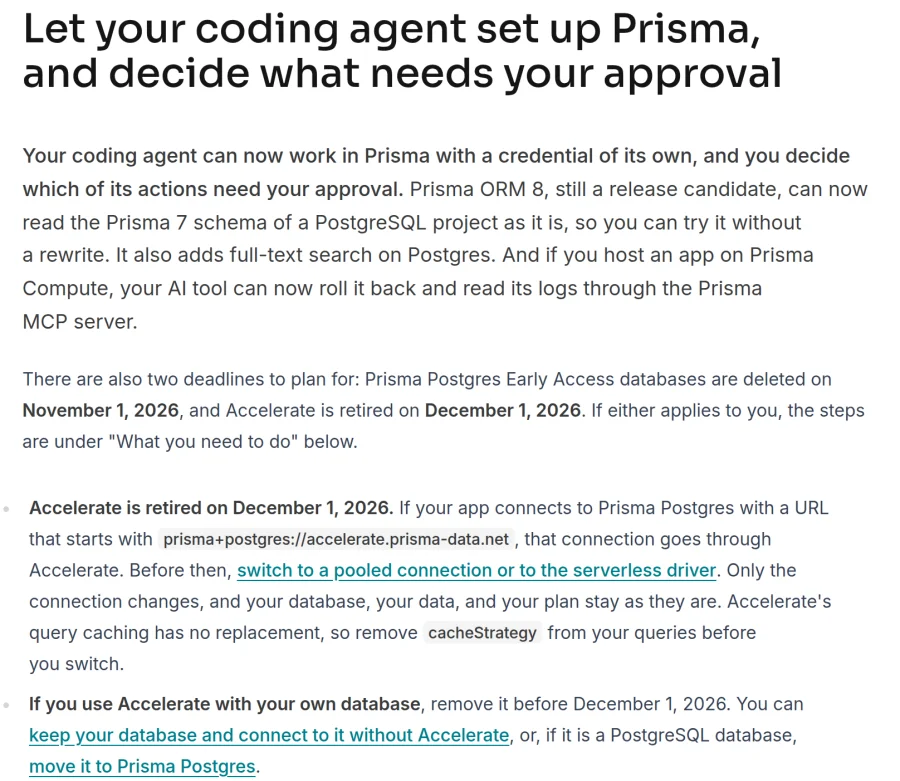
Two excerpts from Prisma's changelog, captured November 11, 2026.
Prisma's recommended path depends on where your database runs, per its Accelerate docs. Prisma Postgres users switch to a pooled connection or the serverless driver. On Neon or Supabase, Prisma says to use "Your host's pooled connection string". For PostgreSQL with no pooler: "If your PostgreSQL host has no pooler, we recommend moving to Prisma Postgres." On caching, the same page says: "Prisma Postgres has no query cache, and query caching is not on our immediate roadmap." Accelerate is one of nine services on our developer service shutdown tracker with a date still ahead.
How we ranked these Prisma Accelerate alternatives
We scored every entry on six criteria, each asking how much of Accelerate it gives back to a Prisma ORM app. Every row links to the vendor page we read on November 11, 2026.
- Connection pooling. Yes: managed pooling built in. Partial: a pooler you install and run yourself. No: none.
- Query caching. Yes: it caches query results with a TTL or keeps them updated, set up in the product, with no cache code in your app. Partial: a cache you read and write from your own code. No: none.
- Edge and serverless. Yes: a Prisma app on an edge runtime can connect, through an HTTP or WebSocket driver or from inside the edge platform. Partial: serverless functions over TCP only. No: neither.
- Works with Prisma ORM. Yes: the vendor's docs or Prisma's docs show Prisma ORM with it. Partial: a standard connection URL works, with no more than a passing mention. No: not with Prisma ORM.
- $0 plan. Yes: a hosted $0 plan with no end date. Partial: a trial, or $0 only as code you host yourself. No: paid only.
- Migration effort. Yes: a connection-string change in front of the database you have, or Prisma's retirement docs name it for your setup. Partial: you move your data, or your app has to run on one platform. No: you change database engine or ORM.
Yes is worth 2 points, Partial 1 and No 0, for a total out of 12. The order of this list follows the totals. Ties go to the higher Query caching score, then Migration effort, then $0 plan, then alphabetical order. To be ranked, a tool had to keep a Prisma ORM app on PostgreSQL or MySQL, give it pooling or caching that Prisma's or the vendor's docs say works, and be maintained on November 11, 2026.
Best Prisma Accelerate alternatives: a quick overview
If you want pooling and caching back in one product:
- Cloudflare Hyperdrive: best for apps on Cloudflare Workers.
- Readyset: best for caching without cache code, in front of the database you have.
If you only need pooling, and your database stays where it is:
- Neon: best for serverless and edge apps already on Neon.
- Prisma Postgres: best for Prisma Postgres users and teams with no pooler today.
- Supabase: best for apps already on Supabase.
- PgBouncer: best for self-hosted PostgreSQL you want to keep running yourself.
If you want a cache you control in code:
- Upstash Redis: best for a per-query cache you call over HTTP.
If you are ready to move the database:
- Xata: best for branch-per-pull-request Postgres with a built-in pooler.
- PlanetScale: best for MySQL or Postgres teams that want pooling and branching from one vendor.
Scores as of November 11, 2026. Yes = 2, Partial = 1, No = 0. Accelerate itself, for reference: managed pooling, query caching with cacheStrategy, edge support and a Prisma extension.
| Tool | Score (of 12) | Connection pooling | Query caching | Edge and serverless | Works with Prisma ORM | $0 plan | Migration effort | Source |
|---|---|---|---|---|---|---|---|---|
| Cloudflare Hyperdrive | 11 | Yes transaction-mode pool | Yes on by default, 60 s | Yes runs in Workers | Yes Cloudflare and Prisma guides | Yes 100,000 queries a day | Partial Workers apps only | Hyperdrive query caching |
| Neon | 10 | Yes PgBouncer, up to 10,000 connections | No | Yes HTTP and WebSocket driver | Yes@prisma/ | Yes Free plan | Yes Prisma names your pooled string | Neon pooling |
| Prisma Postgres | 10 | Yes PgBouncer on every plan | No "not on our immediate roadmap" | Yes serverless driver | Yes same vendor | Yes Free plan | Yes Prisma's own path | Prisma pricing |
| Readyset | 9 | Partial in QueryPilot, which you run | Yes automatic, kept up to date | Partial TCP only | Yes Prisma "Verified" | Partial self-hosted Community | Yes connection-string swap | Readyset ORM support |
| Supabase | 9 | Yes Supavisor, PgBouncer on Pro | No | Partial Prisma connects over TCP | Yes Supabase Prisma guide | Yes Free plan, pauses after a week idle | Yes Prisma names your pooled string | Supabase Prisma guide |
| Upstash Redis | 7 | No | Partial cache code you write | Yes HTTP REST | Partial one guest blog post | Yes Free plan | Partial every cached query needs code | Upstash pricing |
| PgBouncer | 7 | Partial you run it | No | Partial TCP only | Yes Prisma docs | Partial open source (ISC) | Yes in front of your database | PgBouncer features |
| Xata | 7 | Yes built-in PgBouncer | No | Yes HTTP and WebSocket proxy | Partial one line in its docs | Partial trial, or self-host | Partial move your data | Xata pricing |
| PlanetScale | 7 | Yes PgBouncer on every Postgres database | No | Yes serverless drivers | Yes@prisma/ | No from $5 a month | Partial move your data | PlanetScale plans |
Bar chart of the lowest fixed monthly price for a paid plan, read from vendor pricing pages on 11 November 2026. Cloudflare Workers Paid with Hyperdrive $5, PlanetScale single-node Postgres $5, Xata micro instance about $9, Prisma Postgres Starter $10, Upstash Redis fixed plan $10, Supabase Pro $25.
- Cloudflare Workers Paid (Hyperdrive)$5
- PlanetScale single node$5
- Xata micro$9
- Prisma Postgres Starter$10
- Upstash Redis fixed$10
- Supabase Pro$25
Source: Cloudflare Workers pricing, PlanetScale plans, Xata pricing, Prisma pricing, Upstash Redis pricing, Supabase pricing. Checked Nov 11, 2026.
 1. Cloudflare Hyperdrive, Best for apps on Cloudflare Workers
- Score
- 11/12
- $0 plan
- Yes100,000 queries a day
Cloudflare Hyperdrive is a Cloudflare service that pools connections and caches read queries between Cloudflare Workers and an existing PostgreSQL or MySQL database. It is the only hosted option in this list that does both jobs Accelerate did.
Caching needs no code: "Query caching is enabled by default", per Cloudflare's caching docs. The catch is the runtime. Hyperdrive is reached from a Worker binding, so an app on Vercel, Lambda or a Node server would have to move its database calls into a Worker.
Key features
- Read-query cache on by default: 60 seconds max age, 15 seconds stale-while-revalidate, up to 1 hour
- Transaction-mode connection pool kept close to your database
- Works with any PostgreSQL or MySQL host, including AWS, Google Cloud, Azure, Supabase, Neon and PlanetScale
Best for
- Prisma apps that already run on Cloudflare Workers
- Read-heavy pages that can serve data up to a minute old
Pricing The Workers Free plan includes Hyperdrive with 100,000 database queries a day. Workers Paid has a $5 a month minimum per account, with unlimited Hyperdrive queries and no extra charge for pooling or caching (as of November 2026, Hyperdrive pricing).
Pros
- Pooling and caching with no cache code in your app
- A $0 plan with no end date
Cons
- Workers only, so other runtimes can't drop it in
- Writes don't clear the cache: Hyperdrive "does not purge or invalidate cached read query results when your application writes to your database"
- Prisma's Workers guide says to "Leave
cursorout behind Hyperdrive, because reads through a cursor hang there"
 2. Neon, Best for serverless and edge apps already on Neon
- Score
- 10/12
- $0 plan
- YesFree plan
Neon is a serverless PostgreSQL host with built-in PgBouncer pooling and a driver that queries over HTTP or WebSockets. Prisma's retirement table names "Your host's pooled connection string" as the replacement for Neon users.
If your database is already on Neon, the switch is a new URL: the pooled string has -pooler in the hostname. For edge runtimes, Neon's Prisma guide uses the Neon serverless driver adapter.
Key features
- PgBouncer pooling "enabling up to 10,000 concurrent connections"
- Serverless driver over HTTP or WebSockets for Cloudflare Workers and Vercel Edge
@prisma/adapter-neonfor Prisma ORM
Best for
- Apps already on Neon that used Accelerate only for pooling
- Edge functions that can't open TCP connections
Pricing "The Free plan is permanent (not a trial); no credit card required." It includes 100 projects, 100 compute hours per project and 1 GB of storage per project. The Launch plan is usage-based at $0.106 per compute hour and $0.35 per GB-month, with no minimum monthly fee (as of November 2026, Neon plans).
Pros
- A permanent $0 plan with pooling included
- Both Neon and Prisma document the edge setup
Cons
- No query cache found in Neon's docs
- Free compute scales to zero after 5 minutes, and on Free this "cannot be turned off"
- "The pooler rejects
search_pathin startup options", per Neon's Prisma guide
 3. Prisma Postgres, Best for Prisma Postgres users and teams with no pooler
- Score
- 10/12
- $0 plan
- YesFree plan
Prisma Postgres is Prisma's managed PostgreSQL service, with PgBouncer pooling on every plan and a serverless driver for edge runtimes. It is Prisma's own replacement for Accelerate.
For apps already on Prisma Postgres, Prisma's switch guide says "It changes only how your application connects: your database, data, workspace, and plan remain unchanged." If you used Accelerate in front of your own PostgreSQL, moving here means a pg_dump and pg_restore.
Key features
- "Prisma Postgres routes application traffic through a tenant-isolated PgBouncer instance running in transactional pool mode"
- Serverless driver over HTTP and WebSockets, used through
@prisma/adapter-ppg - A documented import from PostgreSQL 9.5 to 17
Best for
- Apps on a
prisma+postgres://accelerate.prisma-data.netURL today - Teams whose PostgreSQL host has no pooler
Pricing Free is $0 with 200,000 operations a month, 2 GB of storage and 10 pooled connections: "Free forever. No credit card required." Starter is $10 a month with 1 million operations, then $8 per million, 10 GB of storage, daily backups and 100 pooled connections (as of November 2026, Prisma pricing).
Pros
- The shortest switch for Prisma Postgres users: a new connection string, nothing else
- Same vendor as the ORM, with a step-by-step guide off Accelerate
Cons
- No query cache, and none planned soon
- Pooled queries "are limited to 10 minutes", per Prisma's pooling docs
- The import does not cover PostgreSQL 18, and Free has no backups
 4. Readyset, Best for caching without cache code
- Score
- 9/12
- $0 plan
- Partialself-hosted Community
Readyset is a caching proxy that speaks the PostgreSQL and MySQL wire protocols, sits in front of your existing database and keeps cached results up to date from the replication stream. Of everything we checked, it comes closest to Accelerate's caching for apps off Cloudflare.
Readyset lists Prisma as "Verified" from version 4.11.0, and "To connect an application to Readyset Cache, simply swap your application's connection string", per its ORM docs. Its homepage says it can "Auto identify slow queries and cache them."
Key features
- Caches kept current from the replication stream, plus TTL-based caches
- Connection-string swap in front of RDS, Aurora, Supabase and other PostgreSQL or MySQL hosts
- QueryPilot, a separate router that pools connections and routes queries
Best for
- Read-heavy apps that relied on
cacheStrategyand run on Node servers or containers - Teams that want caching without picking TTLs per query
Pricing Readyset Community is $0, self-hosted, for production use up to 2 GB of RAM under a source-available license (BSL). There is a 7-day trial. Readyset Cloud is sold through AWS Marketplace, and readyset.io shows no public price for it (as of November 2026, Readyset pricing).
Pros
- Caching with no code changes beyond the URL
- Keeps your database where it is
Cons
- No HTTP driver, so edge runtimes can't reach it
- No public price for the managed version
- Pooling lives in QueryPilot, a second component to run
 5. Supabase, Best for apps already on Supabase
- Score
- 9/12
- $0 plan
- YesFree plan, pauses after a week idle
Supabase is a hosted PostgreSQL platform whose projects come with a shared pooler, Supavisor, and a dedicated PgBouncer pooler on Pro and above. Prisma's retirement table names "Your host's pooled connection string" for Supabase users.
Supabase's Prisma guide uses the transaction pooler on port 6543 with pgbouncer=true at the end of the string, "which turns off prepared statements". Prisma itself connects over TCP, so edge runtimes need another path.
Key features
- Supavisor in session mode (port 5432) and transaction mode (port 6543)
- A dedicated PgBouncer pooler on Pro and above
- Edge Functions and a REST and GraphQL Data API
Best for
- Apps already on Supabase that used Accelerate for pooling
- Serverless functions on Node runtimes
Pricing Free is $0 with a 500 MB database and 2 active projects, and "Free projects are paused after 1 week of inactivity." Pro is $25 a month with an 8 GB disk, daily backups and $10 of compute credits (as of November 2026, Supabase pricing).
Pros
- A pooler on every plan, already set up
- Supabase publishes its own Prisma guide
Cons
- No query cache. Supavisor's README lists "Query caching" under Future Work.
- "The shared pooler doesn't support prepared statements in transaction mode"
- Free projects pause after a week with no activity
 6. Upstash Redis, Best for a per-query cache you call over HTTP
- Score
- 7/12
- $0 plan
- YesFree plan
Upstash Redis is a serverless Redis you call over HTTP, priced per command. It does no pooling. It is the cache you put next to your database when you want cacheStrategy-style caching back and are willing to write it.
The pattern is cache-aside: read the key, query Prisma on a miss, write the result with an expiry. Upstash's Prisma post, by a guest author in January 2025, shows it with a one-hour TTL.
Key features
- HTTP and REST access from Cloudflare Workers and Vercel Edge
- Per-command pricing
- Pairs with any pooler above, since it doesn't touch your database connection
Best for
- A few hot queries that need a cache with keys you choose
- Edge apps that can't use Readyset
Pricing Free is $0 with 250 MB of data, 10 GB of bandwidth and 500,000 commands a month. Pay as you go is $0.2 per 100,000 commands, and fixed plans start at $10 a month (as of November 2026, Upstash pricing).
Pros
- A $0 plan with no end date
- Works from every runtime in this list
Cons
- No connection pooling
- You write and clear the cache yourself
- No Prisma page in Upstash's docs, only the blog post
7. PgBouncer, Best for self-hosted PostgreSQL you run yourself
- Score
- 7/12
- $0 plan
- Partialopen source (ISC)
PgBouncer is an open-source connection pooler that sits between your app and PostgreSQL, under the ISC license. Prisma's retirement table names "a pooler you add in front of your database" for PostgreSQL with no pooler, and PgBouncer is the standard one.
Prisma documents the setup: "For Prisma Client to work reliably, PgBouncer must run in Transaction mode", per Prisma's PgBouncer page.
Key features
- Session, transaction and statement pooling
- "Low memory requirements (2 kB per connection by default)"
- Online restart and upgrade without dropping client connections
Best for
- Teams that run their own PostgreSQL servers and want to keep them
- Node servers and containers that open many connections
Pricing PgBouncer is $0 open source. You pay for the server you run it on (as of November 2026, PgBouncer).
Pros
- No vendor, no bill beyond your server
- Prisma documents the exact mode it needs
Cons
- You run and patch it. Version 1.26.1, released October 14, 2026, "fixes three CVEs", one of them an authentication bypass.
- Transaction mode "breaks a few session-based features of PostgreSQL"
- No cache and no HTTP access for edge runtimes
 8. Xata, Best for branch-per-pull-request Postgres with a pooler
- Score
- 7/12
- $0 plan
- Partialtrial, or self-host
Xata is a managed PostgreSQL platform with copy-on-write branches, scale to zero and a built-in PgBouncer pooler, plus an open-source self-hosted edition. On November 9, 2026, Xata announced it is joining ClickHouse.
Read the ownership news before you move. Xata's announcement says "we continue to accept new sign-ups" and also "We will eventually migrate Xata customers to ClickHouse Managed Postgres." Leaving one retired product for another planned move is a real cost.
Key features
- Copy-on-write branches off a live database
- A built-in PgBouncer pooler, used by serverless connections by default
- An HTTP and WebSocket proxy compatible with the Neon serverless driver
Best for
- Teams that want a database branch for every pull request
- Edge apps that need pooling and an HTTP driver
Pricing There is no hosted $0 plan: "Is there a free tier? No." Xata Cloud offers a trial, and the smallest instance is $0.012 an hour (about $9 a month) plus $0.28 per GB-month of storage. The self-hosted edition is open source (as of November 2026, Xata pricing).
Pros
- Pooling and an HTTP driver on the same platform
- Plain PostgreSQL, so Prisma connects with a standard URL
Cons
- Customers will be moved to ClickHouse Managed Postgres at some point
- No Prisma guide. Its docs say only that Prisma "works without changes".
- No query cache
 9. PlanetScale, Best for teams that want pooling and branching from one vendor
- Score
- 7/12
- $0 plan
- Nofrom $5 a month
PlanetScale is a managed database platform for Vitess (MySQL) and PostgreSQL, with PgBouncer in every PostgreSQL database. Prisma ORM connects through @prisma/adapter-planetscale.
"Every PlanetScale Postgres database includes an instance of PgBouncer", on port 6432, per PlanetScale's docs. Moving here means moving your data, with imports documented from Supabase, Neon, Heroku and Aurora.
Key features
- PgBouncer on every PostgreSQL database, included in the cluster price
- An HTTP serverless driver for Vitess and the Neon driver for PostgreSQL
- A Prisma guide for both MySQL and PostgreSQL
Best for
- MySQL apps that want a managed host with an HTTP driver
- Teams moving to a new database anyway
Pricing "PlanetScale does not offer a free plan." Single-node PostgreSQL databases start at $5 a month (as of November 2026, PlanetScale plans).
Pros
- Pooling and an HTTP driver, documented for Prisma by both vendors
- A low entry price for a single node
Cons
- No free plan
- We found no query cache on PlanetScale's current pages
- PlanetScale MySQL "requires
relationMode = "prisma"" in Prisma, per Prisma's quickstart
What we left out, and why
- AWS RDS Proxy. Prisma's own AWS caveats page says "there is no benefit in using it for connection pooling with Prisma ORM due to the way RDS Proxy pins connections".
- Turso. It moves you to SQLite, and "Prisma Migrate and Introspection workflows are currently not supported when working with Turso", per Turso's Prisma docs.
- PgCat. Its repository has had no tagged release since August 2024.
- Drizzle ORM's cache. It works with Upstash, but using it means leaving Prisma ORM.
- Prisma Cloud. It is Palo Alto Networks' security product, not part of Prisma ORM.
How to switch off Prisma Accelerate before December 1
These steps come from Prisma's keep your database and switch from Accelerate guides. Prisma's own warning: "Removing Accelerate also removes its managed connection pooling and query caching."
- Find every Accelerate touchpoint. Prisma's guide lists the search terms, including
prisma+postgres://accelerate.prisma-data.net,withAccelerate,accelerateUrl,@prisma/extension-accelerateandcacheStrategy. Record each match before you change anything. - Remove the caching calls. Prisma says to "remove every Accelerate caching API before you switch". If a page needs a cache, pick Hyperdrive, Readyset or Upstash from the list above first.
- Choose a connection per runtime. Prisma's guidance: a long-running Node.js or Bun server may use a direct URL if the database's connection limit allows it. Serverless functions need a pooled URL. On edge runtimes, confirm the driver can connect without Accelerate.
- Replace the URL and keep a direct one. Change
DATABASE_URLfrom the Accelerate URL to the pooled or direct URL. Keep a separate direct URL for migrations, introspection and Prisma Studio. - Remove the extension. Delete the
withAccelerateimport,accelerateUrland$extends(withAccelerate()), then uninstall@prisma/extension-accelerate. On Prisma ORM 7, connect through a driver adapter. MongoDB is not supported in Prisma ORM 7, so Prisma says to keep those apps on Prisma ORM 6.19 for this change. - Test at real concurrency. Prisma's guide says to "confirm that your application has a safe way to connect at its expected concurrency and that it does not depend on cached query results."
If you are on Prisma ORM 8, Prisma says "a project on Prisma ORM 8 has nothing to switch". ORM 8, still a release candidate, also ships an in-memory cache middleware. Its docs say "Writes do not clear anything on their own", so treat it as a per-process cache, not a replacement for a shared one.
If you'd rather have someone handle the switch: AY Automate is a workflow automation service. It builds custom-code automations for clients. It is a service, not a pooler or cache, so it isn't ranked or scored above.
How to choose a Prisma Accelerate alternative
1) Did you use cacheStrategy?
If no, you only need pooling: use your host's pooler (Neon, Supabase), Prisma Postgres, or PgBouncer. If yes, pick by runtime: Hyperdrive on Cloudflare Workers, Readyset on servers and containers, Upstash Redis if you want to choose cache keys in code.
2) Where does your app run?
Edge runtimes need an HTTP or WebSocket driver: Prisma Postgres's serverless driver, Neon, Xata or PlanetScale. Cloudflare Workers can also use Hyperdrive. Long-running servers can use any option here, including a direct URL if your connection limit holds.
3) Do you want to move your database?
Most teams shouldn't, with 20 days left. Neon, Supabase and Prisma Postgres users change one URL. Hyperdrive, Readyset and PgBouncer sit in front of the database you have. Xata and PlanetScale mean a data move.
Get your developer tool into lists like this one
If you build a database or developer tool, being named on pages like this one is how developers and AI search find you. AY Listicle puts SaaS products into "best of" listicles that buyers and AI search read, and we check every mention every month. Request a spot on AY Listicle.
More comparisons are on the AY Listicle blog, including the best AI models for coding if an agent does your migration.
FAQ
When is Prisma Accelerate retired?
Prisma Accelerate is retired on December 1, 2026, per Prisma's October 2, 2026 changelog. That includes Prisma Postgres connections that go through an Accelerate URL. The Prisma Console no longer offers Accelerate for new setups.
What is the best Prisma Accelerate alternative?
Cloudflare Hyperdrive is the best Prisma Accelerate alternative for apps on Cloudflare Workers: it scored 11 of 12 on our six criteria. It pools connections and caches read queries on its $0 plan. For apps elsewhere, Neon and Prisma Postgres scored 10 for pooling, and Readyset is the closest match for caching.
What does Prisma recommend instead of Accelerate?
Prisma recommends a pooled connection or its serverless driver for Prisma Postgres users, and your host's pooled connection string on Neon or Supabase. "If your PostgreSQL host has no pooler, we recommend moving to Prisma Postgres." For caching, Prisma says it has no drop-in replacement.
Does Prisma Postgres have query caching?
No. Prisma's docs say "Prisma Postgres has no query cache, and query caching is not on our immediate roadmap." Remove every cacheStrategy before you switch. Hyperdrive, Readyset and Upstash Redis are the caching options in this list.
Is there a free Prisma Accelerate alternative?
Yes. Cloudflare Hyperdrive, Neon, Prisma Postgres, Supabase and Upstash Redis all have hosted $0 plans with no end date. PgBouncer and Readyset Community are $0 if you run them yourself. PlanetScale has no free plan, and Xata offers a trial.
Can I keep my own database after Accelerate is retired?
Yes. Prisma's keep-your-database guide replaces the Accelerate URL with a direct or pooled URL for your existing database, and your data doesn't move. Hyperdrive, Readyset and PgBouncer also sit in front of the database you have.
What happens to my app on December 1 if I don't switch?
Prisma's docs say Accelerate "will be retired on December 1, 2026" and don't describe what an Accelerate URL returns after that date. Plan to finish the switch before then. Apps on Prisma ORM 8 don't use hosted Accelerate and have nothing to switch.
Sources: Prisma changelog, October 2, 2026, Prisma Accelerate docs, Keep your existing database, Connect to Prisma Postgres without Accelerate, Hyperdrive pricing, Neon plans, Prisma pricing, Readyset pricing, Supabase pricing, Upstash pricing, PgBouncer, Xata pricing, PlanetScale plans, Xata joins ClickHouse. All read November 11, 2026.