
Val Town stops running vals on January 10, 2027, so every cron job, webhook and HTTP endpoint on a val.run URL needs a new home within 60 days. Code turns read-only even sooner, on December 10, 2026.
Val Town gave you four things in one place: a TypeScript file that answers on a URL, cron, email triggers and SQLite. Few Val Town alternatives give you all four, and the host you pick decides how much code you rewrite. This page scores 10 of them on six named criteria, with prices, weak spots and a migration plan.
When Val Town shuts down: the dates
Val Town announced the wind-down on November 10, 2026, in a post by Steve Krouse titled Val Town is winding down. The timeline, quoted exactly from that post:
| Service | End of life date |
|---|---|
| New signups and plan upgrades | Nov 10, 2026 (today) |
| Read-only mode (not including sqlite and blob storage) | Dec 10, 2026 |
| All other services | Jan 10, 2027 |
| Open-sourcing Val Town | Feb 1, 2027 |
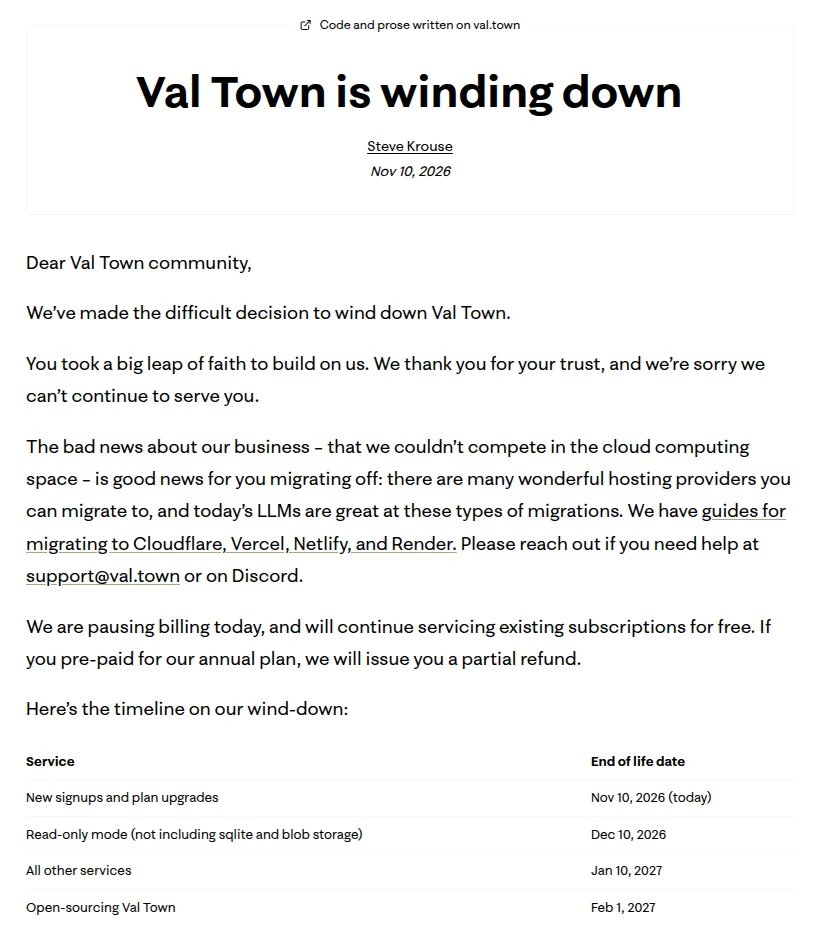
Screenshot of Val Town's announcement, captured November 11, 2026.
Billing is paused, and annual plans get a partial refund. Val Town's migration guide says vals "will continue running until January 10, 2027" and covers four destinations: Cloudflare, Vercel, Netlify and Render.
How we ranked these Val Town alternatives
We scored every entry on the same six criteria, each asking how close a host comes to what a val did. Every row links to the vendor page we read on November 11, 2026.
- Script to URL. Yes: one TypeScript or JavaScript file becomes a public HTTPS URL from a browser editor or one CLI command, and a webhook can call it. Partial: it needs a server or container, a token on every call, or a beta feature. No: no public URL.
- Cron on the $0 plan. Yes: built in, and it runs every 15 minutes or faster on the $0 plan (Val Town Free's own limit, per its cron docs). Partial: built in but slower, paid only, trial only, or the interval is not published. No: none.
- Inbound email. Yes: your code runs when an email arrives, with no outside provider. No: you need a provider such as Resend.
- Storage. Yes: a built-in database or key-value store and blob storage, both on the $0 plan. Partial: one of the two, or paid only. No: neither.
- $0 plan. Yes: HTTP and cron run at $0 with no end date. Partial: a trial, a use restriction, sleep or pause after idle time, or an allowance too small for one cron job every 15 minutes. No: none.
- Migration effort. Yes: Val Town publishes a migration guide for it and it uses a web-standard Request to Response handler, like a val. Partial: one of the two. No: neither.
Yes is worth 2 points, Partial 1 and No 0, for a total out of 12. The order of this list follows the totals. Ties go to the higher Script to URL score, then the higher $0 plan score, then the lower first paid price. If one criterion matters more to you, re-rank by that column.
Best Val Town alternatives: a quick overview
If you want the closest replacement for HTTP, cron, email and SQLite vals:
- Cloudflare Workers: best for moving every kind of val to one platform, email vals included.
If your vals are mostly HTTP endpoints and cron jobs:
- Netlify Functions: best for small teams that want a $0 plan with commercial use and scheduled functions.
- Vercel Functions: best for vals that sit next to a Next.js or frontend project you already host on Vercel.
- Supabase Edge Functions: best for vals that read and write a Postgres database, with cron down to one second.
If you liked writing code in the browser:
- Railway Functions: best for pasting one TypeScript file into a browser editor and getting a URL.
- Windmill: best for script-style automations with a web IDE, schedules and email triggers.
If your val is a server, a long job or only a schedule:
- Render: best for vals that grew into a full web service.
- Trigger.dev: best for long-running background jobs with retries.
- Fly.io: best for vals you want to run as a container in a region you pick.
- GitHub Actions: best for cron vals that run a script and need no URL.
Scores as of November 11, 2026. Yes = 2, Partial = 1, No = 0. Val Town itself, for reference: one file per URL, cron every 15 minutes on Free, email triggers, SQLite and blob storage.
| Tool | Score (of 12) | Script to URL | Cron on $0 plan | Inbound email | Storage | $0 plan | Migration effort | Source |
|---|---|---|---|---|---|---|---|---|
| Cloudflare Workers | 12 | Yeswrangler deploy or a browser Playground | Yes every minute, 5 triggers | Yes Email Workers | Yes KV, D1 SQLite, R2 | Yes 100,000 requests a day | Yes Val Town guide, fetch() handler | Workers limits |
| Netlify Functions | 9 | Yes one file, netlify deploy | Partial built in, interval not published | No | Yes Blobs, Netlify Database | Yes 300 credits a month | Yes Val Town guide, Request handler | Scheduled functions |
| Vercel Functions | 8 | Yes one file, vercel | Yes every 15 min with Schedules (beta) | No | Partial Blob built in, SQL and KV via Marketplace | Partial Hobby is non-commercial only | Yes Val Town guide, fetch export | Vercel Schedules limits |
| Supabase Edge Functions | 8 | Yes browser editor or one CLI command | Yes down to 1 second | No | Yes Postgres, Storage | Partial projects pause after a week idle | Partial no Val Town guide, Deno.serve handler | Supabase Cron |
| Railway Functions | 7 | Yes paste one file in the browser | Partial trial only, then $5 Hobby | No | Yes volumes, Buckets, Postgres | Partial 30-day trial, then $1 credit a month | Partial no Val Town guide, fetch export | Railway pricing |
| Windmill | 7 | Partial webhooks need a token | Partial built in, interval not published | Yes email triggers on Free | Yes data tables, object storage | Partial 1,000 executions a month | No different handler, no guide | Windmill pricing |
| Render | 5 | Partial a full web server from Git or Docker | Partial cron jobs are paid | No | Partial free Postgres expires in 30 days | Partial free services sleep after 15 min | Partial Val Town guide, own server | Render free tier |
| Trigger.dev | 4 | Partial webhook endpoints in beta | Partial hourly on Free | No | No | Yes $5 of credits a month | No tasks use the Trigger.dev SDK | Trigger.dev scheduled tasks |
| Fly.io | 4 | Partial a container via fly launch | Partial hourly, daily, weekly or monthly | No | Partial volumes and Tigris, no $0 amount | Partial no free tier, bills under $5 waived | No own server, no guide | Fly.io pricing |
| GitHub Actions | 3 | No no public URL | Yes every 5 minutes | No | No | Partial public-repo schedules stop after 60 days idle | No no guide, workflow YAML | Actions events |
Bar chart of the most frequent cron schedule each $0 plan allows, read from vendor docs on 11 November 2026. Supabase Cron runs every second, Cloudflare Workers every minute, GitHub Actions every 5 minutes, Val Town Free and Vercel Schedules beta every 15 minutes, Trigger.dev Free once an hour.
- Supabase Cronevery second
- Cloudflare Workersevery minute
- GitHub Actionsevery 5 min
- Val Town Free (closing)every 15 min
- Vercel Schedules (beta)every 15 min
- Trigger.devonce an hour
Source: Supabase Cron docs, Cloudflare Cron Triggers, GitHub Actions events, Val Town cron docs, Vercel Schedules limits, Trigger.dev scheduled tasks. Checked Nov 11, 2026.
 1. Cloudflare Workers, Best for moving every kind of val to one platform
- Score
- 12/12
- $0 plan
- Yes100,000 requests a day
Cloudflare Workers is a serverless platform that runs JavaScript and TypeScript on V8 isolates, with cron, inbound email, SQLite, key-value and object storage on the same account. Val Town's own where to migrate page calls Cloudflare "the most feature-equivalent platform to Val Town", and says some of the Val Town team moved their own vals, including the Val Town blog and docs, there.
The mapping is close to one to one. Val Town's Cloudflare guide maps HTTP vals to a Worker fetch() handler, cron vals to Cron Triggers, email vals to Email Routing, std/sqlite to D1 and std/blob to R2.
Key features
- Cron Triggers down to every minute, 5 per account on the $0 plan and 250 on Workers Paid
- Email Workers: an
email()handler runs on each message, with unlimited inbound mail on both plans - D1 (SQLite, 5 GB on the $0 plan), KV (1 GB) and R2 (10 GB a month)
Best for
- Developers with a mix of HTTP, cron and email vals who want one account
- Vals that use Val Town SQLite and need a SQLite target (D1)
Pricing The $0 plan includes 100,000 requests a day and 10 ms of CPU time per invocation. Workers Paid is $5 a month per account, with 10 million requests and 30 million CPU milliseconds included (as of November 2026, Cloudflare Workers pricing).
Pros
- Val Town's guide covers code, secrets, SQLite, blobs, crons, email and domains
- No cold start for the virtual machine, per Cloudflare's how Workers works
Cons
- 10 ms of CPU per call on the $0 plan. Cloudflare's email limits page warns that complex email handlers can fail on it.
- Email Service requires your domain's DNS on Cloudflare, and @valtown.email addresses do not transfer, per Val Town's email guide
- Deno APIs must be swapped for Web or Node APIs
 2. Netlify Functions, Best for a $0 plan with commercial use and scheduled functions
- Score
- 9/12
- $0 plan
- Yes300 credits a month
Netlify Functions is a serverless functions product that runs a TypeScript or JavaScript file on Node.js and answers on your site's domain. A function receives a web-standard Request and returns a Response, so most HTTP vals port with small changes.
Val Town's Netlify guide maps HTTP vals to Functions, cron vals to Scheduled Functions and std/blob to Netlify Blobs. For SQLite it suggests Netlify Database (Postgres) or Turso.
Key features
- One file such as
netlify/functions/hello.mts, deployed withnetlify deploy --prod - Scheduled Functions on all plans, with cron syntax in the file's config
- Netlify Blobs, usable as a key-value store, and Netlify Database (Postgres)
Best for
- Small teams moving HTTP and cron vals that are part of a commercial project
- Vals that store JSON or files and can move to Blobs
Pricing The $0 plan has 300 credits a month with a hard limit. A site that hits it pauses until the next billing cycle. Personal is $9 a month for 1 member with 1,000 credits, and Pro is $20 a month for unlimited members (as of November 2026, Netlify pricing).
Pros
- The $0 plan has no non-commercial clause
- Personal at $9 a month is a low step up
Cons
- Scheduled functions stop after 30 seconds and run only on published deploys, per Netlify's docs. We found no published minimum interval.
- No inbound email. Since September 11, 2026, new teams can't add the Netlify Email Integration either.
- Credits are shared with deploys: each production deploy costs 15 credits
 3. Vercel Functions, Best for vals next to a frontend you already host on Vercel
- Score
- 8/12
- $0 plan
- PartialHobby is non-commercial only
Vercel Functions is a serverless functions product that turns a file such as api/hello.ts into an HTTP endpoint, with Node.js, Bun, Python and other runtimes. Vercel now has two cron products. Cron Jobs is marked legacy, and Schedules, in beta, replaces it.
Val Town's Vercel guide maps cron vals to Schedules (beta) and email vals to a provider webhook such as Resend. For SQLite it points to Turso or Postgres, because Functions "cannot keep a durable local SQLite database".
Key features
- A
fetchexport in one file, deployed with thevercelcommand, which prints the deployment URL - Schedules (beta): every 15 minutes on Hobby, every minute on Pro, any IANA timezone
- Vercel Blob built in, with SQL and key-value stores through the Marketplace
Best for
- Teams whose vals are API routes for a site already on Vercel
- Personal, non-commercial projects that fit the Hobby limits
Pricing Hobby is $0 with 1 million function invocations and 4 hours of active CPU a month, for non-commercial, personal use only. Pro is $20 a month per paid seat and includes $20 of usage credit (as of November 2026, Vercel pricing).
Pros
- Schedules match Val Town Free's 15-minute cron on the $0 plan
- Fluid compute pre-warms production functions to cut cold starts, per Vercel
Cons
- Hobby is non-commercial only, so a work val needs Pro
- Schedules are beta. On Hobby, legacy Cron Jobs run once a day at most, give or take 59 minutes.
- Hobby Schedules stop after 5,000 runs per billing period. One job every 15 minutes uses about 2,900 of them a month.
 4. Supabase Edge Functions, Best for vals that work with a Postgres database
- Score
- 8/12
- $0 plan
- Partialprojects pause after a week idle
Supabase Edge Functions is a serverless functions product that runs TypeScript on the Supabase Edge Runtime, which is Deno compatible, next to a Postgres database. Supabase Cron, built on pg_cron, can call a function on a schedule "anywhere from every second to once a year", per Supabase's cron docs.
Handlers use Deno.serve, Deno.env.get and web Request and Response, so many vals need few changes. Val Town has no Supabase guide, though its where-to-migrate table lists Supabase.
Key features
- Write a function in the dashboard editor ("Via Editor") or deploy with
supabase functions deploy - Cron in seconds or standard syntax, from the dashboard or SQL
- Postgres (500 MB) and Storage (1 GB) on the $0 plan
Best for
- Vals that store rows and can move from SQLite to Postgres
- Cron jobs that need to run more often than once a minute
Pricing The $0 plan includes 500,000 function invocations a month and 2 active projects. Pro starts at $25 a month with 2 million invocations, then $2 per million (as of November 2026, Supabase pricing).
Pros
- The most frequent cron on this list, on every plan
- Code shaped like a val: Deno-style APIs and a web-standard handler
Cons
- $0 projects pause after a week of inactivity
- 2 seconds of CPU per request and 150 seconds of wall clock on the $0 plan, per Supabase limits
- HTML responses work only on custom domains, and the dashboard editor has no version control
- No inbound email, and no SQLite or key-value product
 5. Railway Functions, Best for pasting one TypeScript file into a browser editor
- Score
- 7/12
- $0 plan
- Partial30-day trial, then $1 credit a month
Railway Functions is a Railway service type that runs a single TypeScript file on Bun, written in an in-browser editor, with no git repository. Railway's Functions docs list handling webhooks, cron jobs and simple APIs as what it is for, which is the closest thing on this list to writing a val.
A function exports a fetch handler, and npm packages install themselves when the code runs. When you outgrow one file, the same project can run full services and Postgres.
Key features
- Browser editor, or
railway functions new --path ./api.ts --httpfrom the CLI - Cron on any function or service, at least 5 minutes apart, in UTC
- Volumes, S3-compatible Buckets and a one-click Postgres template
Best for
- Val Town users who mostly edited in the browser
- Single-file webhooks and APIs that may grow into a full service later
Pricing New accounts get a 30-day trial with $5 of credit, then a Free plan with $1 of credit a month. Hobby is $5 a month and includes $5 of usage, with 50 cron jobs per project (as of November 2026, Railway pricing).
Pros
- The most val-like editing on this list: one file, in the browser
- A clear path from one function to services and databases
Cons
- Cron jobs on the Free plan are trial only, so a scheduled val needs Hobby
- One file per function, 96 KB at most
- No inbound email, and no Val Town guide
 6. Windmill, Best for script-style automations with a web IDE and email triggers
- Score
- 7/12
- $0 plan
- Partial1,000 executions a month
Windmill is a developer platform for scripts, flows and apps that runs TypeScript on Bun, Python and other languages, and gives every script a webhook. It is the only host here besides Cloudflare with inbound email, and it is on the $0 cloud plan.
The code shape differs: a script exports a main function that takes arguments, where a val takes a Request. Deno "is no longer offered for new" scripts, per Windmill's TypeScript quickstart, so code moves to Bun.
Key features
- Web IDE, CLI and GitHub sync
- Autogenerated webhooks for every script and flow
- Email triggers, unlimited on the cloud Free plan
- Schedules with cron syntax, including an optional seconds field
- Data tables (Postgres), object storage and volumes
Best for
- Internal automations that glue APIs together and run on a schedule
- Teams that also want multi-step flows and a script editor in one place
Pricing Cloud Free is $0 with 1,000 executions a month, where one execution is up to one second of job time. Team starts at $10 a month per builder, with 10,000 executions per seat (as of November 2026, Windmill pricing). Self-hosting is open source.
Pros
- Email triggers and schedules on the $0 plan
- Browser editing, versioning in the UI and Git sync
Cons
- Webhooks need a bearer token. Open HTTP routes need a workspace admin to set up, per Windmill's webhook docs.
- 1,000 executions a month will not cover one job every 15 minutes (about 2,900 runs)
- No Val Town guide, and handlers need rewriting
 7. Render, Best for vals that grew into a full web service
- Score
- 5/12
- $0 plan
- Partialfree services sleep after 15 min
Render is a cloud hosting platform that runs web services, background workers, cron jobs and databases from a Git repo or a Docker image. It is one of the four platforms Val Town wrote a migration guide for, but it runs a server you write, not a single function.
Val Town's Render guide maps HTTP vals to a web service and cron vals to a cron job. Your app binds to a port, and TypeScript needs a build step.
Key features
- Web services, background workers and cron jobs in one dashboard
- Native Node.js and Bun, or any language through Docker
- Postgres, Redis-compatible Key Value and persistent disks
Best for
- Vals that became Hono or Express apps with several routes
- Teams that want long cron runs and a familiar server model
Pricing The Hobby workspace is $0 with free web services that sleep. A Starter web service is $7 a month. Cron jobs are paid only, with a $1 a month minimum per job. Pro is $25 a month plus compute, with unlimited seats (as of November 2026, Render pricing).
Pros
- Val Town guide for code, env vars, SQLite, jobs, email and domains
- Cron runs can last up to 12 hours
- Flat Pro price for unlimited seats
Cons
- Free web services spin down after 15 idle minutes and take about a minute to wake, per Render's free tier docs
- No cron on the $0 plan, and free Postgres expires 30 days after creation
- No single-file deploy: Git repo or Docker image only
 8. Trigger.dev, Best for long-running background jobs with retries
- Score
- 4/12
- $0 plan
- Yes$5 of credits a month
Trigger.dev is a background jobs platform that deploys TypeScript tasks and runs them on its own managed machines, on Node.js by default. It suits cron vals that do heavy work, because runs have no maximum duration, per Trigger.dev limits.
HTTP vals map poorly. Webhook endpoints are in public beta, accept only verified requests and can't return your own response.
Key features
- Scheduled tasks with cron syntax
- No maximum run duration, with per-task limits you set
- Hosted webhook endpoints (beta) that start tasks
Best for
- Cron vals that scrape, call LLMs or process files for minutes at a time
- Teams that want retries and run logs without running a queue
Pricing Free is $0 with $5 of credits a month and 10 schedules. Hobby is $10 a month with $10 of credits and 100 schedules. Pro is $50 a month (as of November 2026, Trigger.dev pricing).
Pros
- No duration cap, unlike every function host above
- The $0 plan has no end date
Cons
- Free schedules run once an hour at most. New schedules get a 60-minute random window unless you set
window: "0m". - No built-in database or key-value store
- Code has to be rewritten as SDK tasks
 9. Fly.io, Best for vals you want to run as a container in a region you pick
- Score
- 4/12
- $0 plan
- Partialno free tier, bills under $5 waived
Fly.io is a cloud platform that runs apps as containers on Fly Machines, billed per second. fly launch scans your project and writes a Dockerfile for you, then fly deploy ships it to a *.fly.dev URL.
Scheduling is the weak spot for a val user. Built-in scheduled Machines run "hourly, daily, weekly, or monthly", and cron syntax needs Cron Manager (a separate Fly app) or Supercronic inside your container, per Fly's task scheduling guide.
Key features
- Any language in a container, with Node.js docs and generated Dockerfiles
- Volumes, Tigris object storage and Managed Postgres
- Secrets set with
fly secrets set
Best for
- Vals that became full apps and need a specific region
- Developers comfortable with containers
Pricing New organizations have no free tier. New accounts get $1 of credit for 7 days. With a card on file, a monthly bill under $5 is waived. The cheapest always-on Machine costs $2.19 per 30 days, and Managed Postgres starts at $38 a month (as of November 2026, Fly.io pricing).
Pros
- Runs anything, not only JavaScript
- Fast resume for suspended Machines
Cons
- No cron syntax without an extra app or process
- Containers and Dockerfiles, a long way from one file per URL
- No free tier and no Val Town guide
 10. GitHub Actions, Best for cron vals that run a script and need no URL
- Score
- 3/12
- $0 plan
- Partialpublic-repo schedules stop after 60 days idle
GitHub Actions is GitHub's workflow runner, and its schedule event runs a job on POSIX cron syntax as often as every 5 minutes. For a cron val that fetches something and posts it somewhere, a workflow in the repo that holds your exported vals may be all you need.
It does not replace HTTP or email vals: outside triggers need the API and a token (repository_dispatch).
Key features
- Cron schedules in UTC or any IANA timezone
- Jobs can run up to 6 hours
- Secrets set in the repo settings or with
gh secret set
Best for
- Daily or hourly scripts that don't need a URL
- People who want their migrated code and its schedule in one repository
Pricing GitHub Free includes $12 of Actions compute a month (shown as 2,000 minutes on the pricing page), and standard runners are free in public repositories. Team is $4 per user a month with 3,000 minutes (as of November 2026, GitHub Actions billing and GitHub pricing).
Pros
- The 5-minute minimum beats Val Town Free's 15 minutes
- No new vendor if your code already lives on GitHub
Cons
- Scheduled runs can be delayed at busy times, and "some queued jobs may be dropped", per GitHub's docs
- In public repositories, schedules turn off after 60 days with no activity
- No URL, no email trigger and no storage beyond artifacts and cache
What we left out, and why
- Deno Deploy. It runs Deno, the runtime Val Town uses, but Deno announced on October 9, 2026 that "Deno Deploy will continue operating for six months before shutting down". The exact date is not stated. Val Town's migration guide recommends moving to Node, Bun or a provider runtime for the same reason. See our Deno Deploy alternatives.
- Pipedream Workflows. Its docs say Workflows shuts down on March 31, 2027 and is "no longer accepting signups or subscriptions". We ranked Pipedream alternatives separately.
- Inngest. It runs durable functions and cron, but it calls code that you host elsewhere, usually at
/api/inngest, per Inngest's docs. It does not replace the host.
Every dated developer shutdown we found, with the vendor's own words, is in our developer service shutdown tracker.
How to migrate your vals before December 10
Plan to finish the move, and set your redirects, before code turns read-only on December 10, 2026. These steps come from Val Town's own migration guide.
- List what you still need. Val Town's guide suggests connecting its plugin or MCP server to an AI agent to help pick which vals to move. The Val Town CLI (
vt clone) pulls a val to a local folder. - Export the code. The announcement does not state an export format (not stated). The GitHub guide says to export each app with the val files it imports, including esm.town imports, replace those imports with local files, and keep secret values out of the repo.
- Map each trigger. HTTP vals become a Cloudflare
fetch()handler, a Vercel Function or a Netlify Function. Cron vals become Cloudflare Cron Triggers, Vercel Schedules (beta), Netlify Scheduled Functions or a Render cron job. Email vals become a Cloudflare Email Worker, or on Vercel, Netlify and Render, an inbound webhook from an email provider such as Resend. - Move env vars. Val Town's guides have you encrypt the values inside Val Town with a local key, decrypt them on your machine, and pipe them into the new host:
wrangler secret bulkon Cloudflare, the Vercel CLI, the Netlify API or Render's API. - Move SQLite and blobs. The guides export SQLite through a temporary HTTP val that streams SQL, then load it into D1, Turso or Postgres. Blobs go to R2, Vercel Blob, Netlify Blobs or object storage. The announcement's read-only line says "(not including sqlite and blob storage)". It does not state what that means for reads and writes to that data before January 10. If your app reaches Postgres through Prisma Accelerate, Prisma retires Accelerate on December 1, 2026; our Prisma Accelerate alternatives list the replacements.
- Change Deno code.
Deno.env.getbecomesprocess.envon Vercel and Netlify. - Redirect val.run URLs last. Per Val Town's redirect guide, a val stops receiving requests as soon as its redirect is set. You can add or edit redirects until December 10, 2026, when they become permanent. Many webhook senders don't follow redirects, so update those URLs with each provider. Custom domains need a DNS change.
If you'd rather have someone migrate your vals for you: AY Automate is a workflow automation service. It builds webhook and cron workflows in custom code, and its page prices a single workflow at low four figures. It is a service, not a host, so it isn't ranked or scored above.
How to choose a Val Town alternative
1) Do you have email vals?
If yes: pick Cloudflare Workers if you can move your domain's DNS to Cloudflare, or Windmill if you want an address without touching DNS. Every other host here needs an outside email provider for inbound mail.
2) Are your vals mostly HTTP endpoints, or mostly cron jobs?
For HTTP endpoints: Cloudflare Workers, Netlify Functions or Vercel Functions. All three take a web-standard handler and have a Val Town guide. For cron jobs only: Supabase if you want seconds-level schedules with a database, GitHub Actions if a 5-minute schedule with no URL is enough, Trigger.dev if a job runs for minutes.
3) Is the val for work or for fun?
Vercel's Hobby plan is non-commercial only, so a work val there means $20 a month per seat. Netlify's and Cloudflare's $0 plans have no such clause. Count the real monthly cost: Cloudflare Workers Paid is $5 per account, Railway Hobby $5 and Netlify Personal $9.
4) Do you want to keep editing in the browser?
Railway Functions and Windmill have browser editors built for this. Supabase has one, without version control. Everywhere else you edit locally and deploy with a CLI or git push.
Get your dev tool into lists like this one
If you build a developer tool, being named on pages like this one is how developers and AI search find you. AY Listicle puts SaaS products into "best of" listicles that buyers and AI search read, and we check every mention every month. Request a spot on AY Listicle.
More comparisons are on the AY Listicle blog, including the best AI models for coding if an agent does your migration.
FAQ
When does Val Town shut down?
Val Town shuts down on January 10, 2027, when "all other services" end, per its November 10, 2026 announcement. Code becomes read-only on December 10, 2026, and Val Town plans to open-source the platform on February 1, 2027.
What is the best Val Town alternative?
Cloudflare Workers is the best Val Town alternative for most vals: it scored 12 of 12 on our six criteria. It covers HTTP, cron every minute, inbound email, SQLite (D1) and blob storage (R2) on the $0 plan. Val Town's own docs call it the most feature-equivalent platform.
Is there a free Val Town alternative with cron jobs?
Yes. Cloudflare Workers runs Cron Triggers every minute on its $0 plan, Supabase Cron runs as often as every second, and GitHub Actions every 5 minutes. Vercel's Hobby plan runs Schedules (beta) every 15 minutes, but Hobby is for non-commercial use only.
Which Val Town alternatives support email triggers?
Cloudflare Workers and Windmill run your code when an email arrives, with no outside provider. On Vercel, Netlify and Render, Val Town's guides route inbound mail through a provider webhook such as Resend. Your @valtown.email addresses do not transfer.
Can I keep my val.run URLs working after Val Town shuts down?
You can redirect val.run URLs to new addresses, and Val Town says redirects set by December 10, 2026 become permanent. The val stops receiving requests as soon as its redirect is set, so add it after the move. Many webhook senders don't follow redirects, so update webhook URLs with each provider.
Should I move my vals to Deno Deploy?
No, Deno Deploy is shutting down too. Deno said on October 9, 2026 that Deploy will keep running for six months before shutting down, and the Deno runtime gets one more year of fixes. Val Town recommends Node, Bun or a provider runtime such as Cloudflare Workers or Vercel Functions.
How do I export my vals from Val Town?
Val Town's announcement does not state an export format. Its docs suggest connecting the Val Town plugin or MCP server to an AI agent, or using the vt CLI, then committing each app and its imported vals to a GitHub repository. SQLite data is exported through a temporary HTTP val that streams SQL.
Can an AI agent migrate my vals?
Yes. Val Town's migration guide includes a prompt for an AI agent that installs the Val Town MCP server, helps pick the vals to keep and proposes a plan for you to approve. Check each migrated val and its data before you set redirects.
Sources: Val Town is winding down, Val Town migration guide, Val Town where to migrate, Val Town redirects, Deno is joining Cloudflare, Cloudflare Workers pricing, Netlify pricing, Vercel pricing, Supabase pricing, Railway pricing, Windmill pricing, Render pricing, Trigger.dev pricing, Fly.io pricing, GitHub Actions billing, Pipedream Workflows, Inngest docs. All read November 11, 2026.